Migrating from Kafka to Redis Streams in a Logstash ETL Pipeline
Introduction
The pipeline that processes our event logs (security logs, application logs, audit logs) had been running Kafka as the message broker between stages from day one — that's the default advice you get whenever ETL/streaming comes up. But once we actually looked at the cluster it was running on (single-node K3s, throughput in the thousands-to-tens-of-thousands events/sec range) against the resources Kafka was consuming, it was way more than we needed. A broker cluster to maintain, several GB of memory footprint paid every day, in exchange for throughput that used less than 1% of what Kafka was designed to handle.
So we decided to move to Redis Streams instead, with one hard constraint: don't break anything downstream (dashboards, other downstream consumers). That meant preserving the existing consumer group and topic/stream semantics exactly. Here's the thinking, the problems we ran into, and what actually fixed them along the way.
Architecture: Before vs After
Before — Kafka
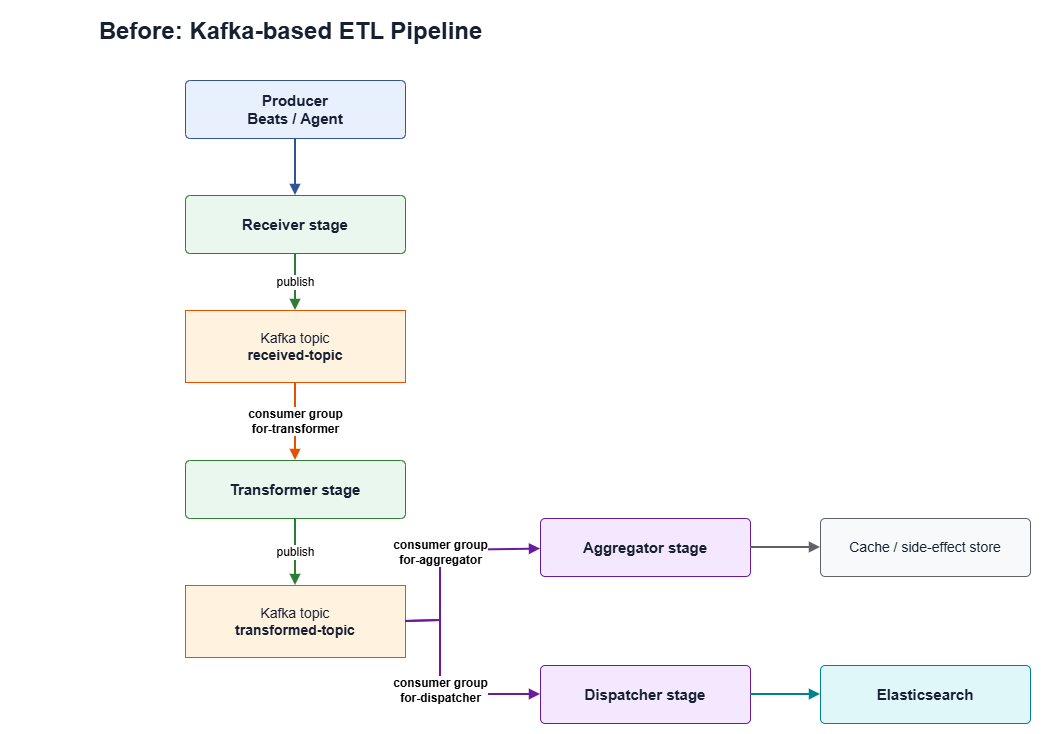
Kafka consumer groups:
for-transformer— reads fromreceived-topicfor-aggregator— reads fromtransformed-topicfor-dispatcher— reads fromtransformed-topic
After — Redis Streams
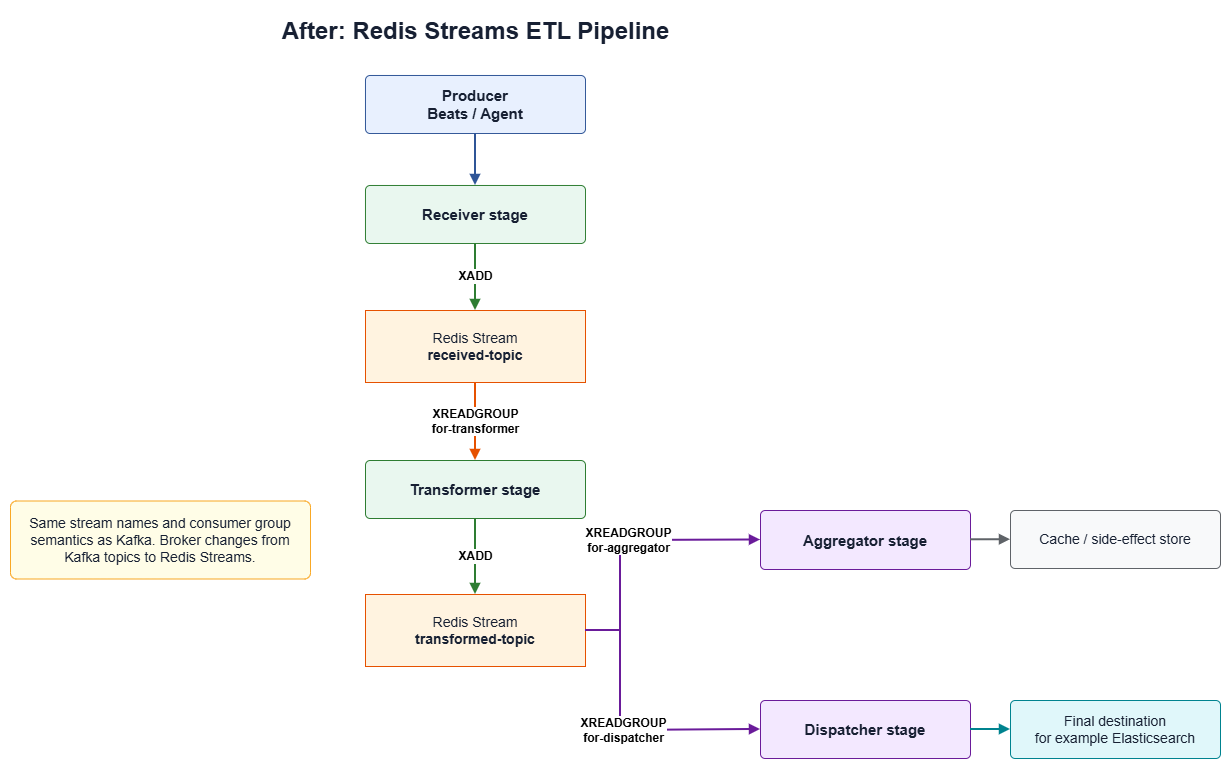
Stream and consumer group names stay identical to Kafka — only the broker underneath changes.
Key differences between the two architectures
| Component | Kafka (Before) | Redis Streams (After) |
|---|---|---|
| Message storage | Kafka topic (log-based, on disk) | Redis Stream (in-memory, a single Redis key) |
| Broker | Multi-node broker cluster + coordination service | A single Redis instance |
| Group-based reads | Kafka consumer group (auto offset commit) | XGROUP + XREADGROUP (must call XACK yourself after successful processing) |
| Size limiting | Built-in retention policy (time/size) at the broker | Must set MAXLEN/XTRIM yourself |
| Topic/group names | received-topic, for-transformer, etc. |
Identical, character-for-character for backward compatibility |
Pipeline overview diagram (Producer → Elasticsearch)
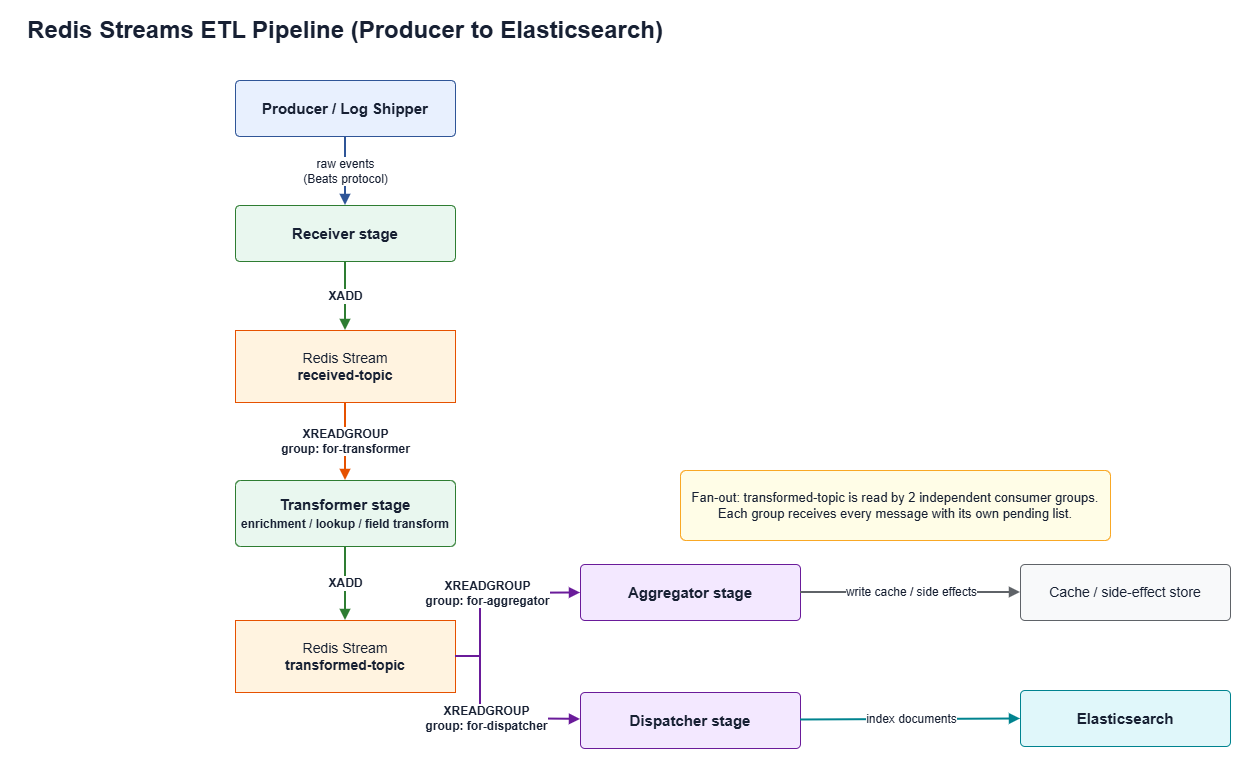
The
transformed-topicstream is read by 2 consumer groups at once (fan-out) — each group has its own job. Both groups see every message without stepping on each other, since each group tracks its own pending list independently.
Why Redis Streams? — Full comparison table
| Dimension | Kafka | Redis Streams |
|---|---|---|
| Components to deploy | Multi-node broker cluster + coordination service (e.g. KRaft/ZooKeeper) | A single Redis instance (standalone is enough for a small workload) |
| Memory footprint (illustrative, not exact numbers) | Several GB (e.g. ~2-4 GB for a minimal cluster) | Hundreds of MB |
| Deployment complexity | High | Low-to-moderate |
| Consumer group support | ✅ Native (offset commit) | ✅ XGROUP/XREADGROUP + you must call XACK yourself |
| At-least-once delivery | ✅ | ✅ |
| Persistence | Writes every message to disk by default (log-based) | Lives in RAM primarily — you must enable AOF/RDB yourself to survive a restart |
| Retention | Built-in time/size-based policy | Must be managed yourself via MAXLEN/XTRIM |
| Log Compaction | ✅ Supported (keeps the latest record per key) | ❌ Not available |
| Dead Letter Queue | ⚠️ Not truly built-in — must be assembled via Kafka Connect/Streams error handlers | ⚠️ Must be built yourself via PEL + XPENDING/XCLAIM — roughly the same amount of effort |
| Schema validation | ⚠️ Requires a separate Schema Registry (not part of Kafka core) | ⚠️ Not available — must be checked yourself at the application layer — a wash if you're not running Schema Registry anyway |
| High availability | ⚠️ Requires configuring multi-broker + replication factor yourself; not the default for a single deployment | ⚠️ Standalone is a single point of failure too — you need Sentinel/Cluster on top for HA — about the same extra work |
| Throughput ceiling (approximate) | Millions of messages/sec | Tens of thousands to hundreds of thousands of messages/sec |
| Good fit for a small cluster / moderate throughput | ⚠️ Overkill | ✅ Very good fit |
For a small cluster with moderate throughput, Redis Streams gives a delivery guarantee close enough to Kafka's while using a fraction of the resources — in exchange for the limitations listed above (persistence, retention, HA, etc.). See "Limitations of Redis Streams" below for how we handled each one.
Redis Streams — the essential commands
Redis Streams is an append-only log data structure in Redis that supports a producer/consumer pattern similar to Kafka, but running directly inside Redis.
XADD — add a message to a stream
XADD <stream> [MAXLEN [~] <count>] * <field> <value> [<field> <value> ...]
* tells Redis to auto-generate an ID in the form <timestamp>-<sequence>.
Example:
XADD received-topic * data '{"field":"value"}'
# → "1719500000000-0"  (ID generated by Redis)
In Ruby (redis gem 4.x):
$r.xadd('received-topic', { 'data' => payload.to_json }, id: '*', maxlen: 100_000, approximate: true)
Every message added via XADD gets a unique ID and is always ordered by time.
XGROUP — create and manage a Consumer Group
XGROUP CREATE <stream> <group> <id> [MKSTREAM]
A consumer group is a set of consumers that share the work of reading a stream — each message is delivered to exactly one consumer in the group (not broadcast to all of them).
Example:
# Create group "for-transformer" on stream "received-topic"
# Start reading only new messages ($), create the stream if it doesn't exist
XGROUP CREATE received-topic for-transformer $ MKSTREAM
In Ruby:
$r.xgroup(:create, 'received-topic', 'for-transformer', '$', mkstream: true)
$= start from new messages after the group is created0= start reading from the very beginning of the stream
XREADGROUP — read messages as a consumer in a group
XREADGROUP GROUP <group> <consumer> [COUNT <count>] [BLOCK <ms>] STREAMS <stream> >
> means "read new messages that no consumer has read yet" — Redis assigns the message to that consumer and adds it to the Pending Entry List (PEL) until it's acknowledged with XACK.
Example:
XREADGROUP GROUP for-transformer consumer-1 COUNT 1 BLOCK 1000 STREAMS received-topic >
In Ruby:
entries = $r.xreadgroup('for-transformer', 'consumer-1', 'received-topic', '>', count: 1, block: 1000)
# entries = { "received-topic" => [["1719500000000-0", { "data" => "..." }]] }
BLOCK 1000= wait 1000 ms if there's no new message (no busy-waiting)COUNT 1= read one message at a time ifentriesis nil or the stream array is empty, there's no new message right now
XACK — acknowledge that a message was processed successfully
XACK <stream> <group> <id> [<id> ...]
After a consumer finishes processing a message, it must call XACK to tell Redis it's done. Redis then removes that message from the group's Pending Entry List (PEL).
Example:
XACK received-topic for-transformer 1719500000000-0
In Ruby:
$r.xack('received-topic', 'for-transformer', message_id)
⚠️ If you don't call XACK — the message stays in the PEL forever. Redis still considers it "in progress." ⚠️ If a consumer crashes before XACK — you need
XCLAIMto reassign the message to another consumer.
The correct pattern:
id, fields = entries['received-topic'].first
begin
  process(fields['data'])      # process it
  $r.xack(stream, group, id)   # XACK once it succeeds
rescue => e
  # don't XACK → message stays in PEL, waiting for a retry
  logger.error("failed: #{e}")
end
XPENDING — inspect messages stuck in the PEL
XPENDING <stream> <group> [IDLE <min-idle-time>] <start> <end> <count> [<consumer>]
Use this to check whether there are messages that were read but never acknowledged.
Example:
# summary of the group's PEL
XPENDING received-topic for-transformer

# list pending messages (oldest ID first)
XPENDING received-topic for-transformer - + 10

# only messages that have been pending for more than 60 seconds
XPENDING received-topic for-transformer IDLE 60000 - + 10
Result:
1) "1719500000000-0"   # message ID
2) "consumer-1"        # consumer holding it
3) (integer) 75000     # been in the PEL for 75 seconds
4) (integer) 1         # delivery count (how many times it's been delivered)
A high delivery count usually means the consumer is repeatedly crashing or has a logic bug. Use
XCLAIMto move the message to a healthy consumer.
MAXLEN — cap the size of a stream
MAXLEN isn't a standalone command — it's an option on XADD and XTRIM.
# trim the stream to at most 100,000 messages (exact)
XADD mystream MAXLEN 100000 * field value

# approximate trim (faster, recommended)
XADD mystream MAXLEN ~ 100000 * field value

# trim as a separate call
XTRIM mystream MAXLEN ~ 100000
~ (approximate trim) — Redis trims once it reaches a convenient point rather than on every single insert, which is much faster.
In Ruby:
$r.xadd(stream, { 'data' => payload }, id: '*', maxlen: 100_000, approximate: true)
⚠️ Without MAXLEN, a stream will keep growing until it eats up all your RAM. We recommend setting MAXLEN on every stream by default.
Fan-out flow overview for Redis Streams
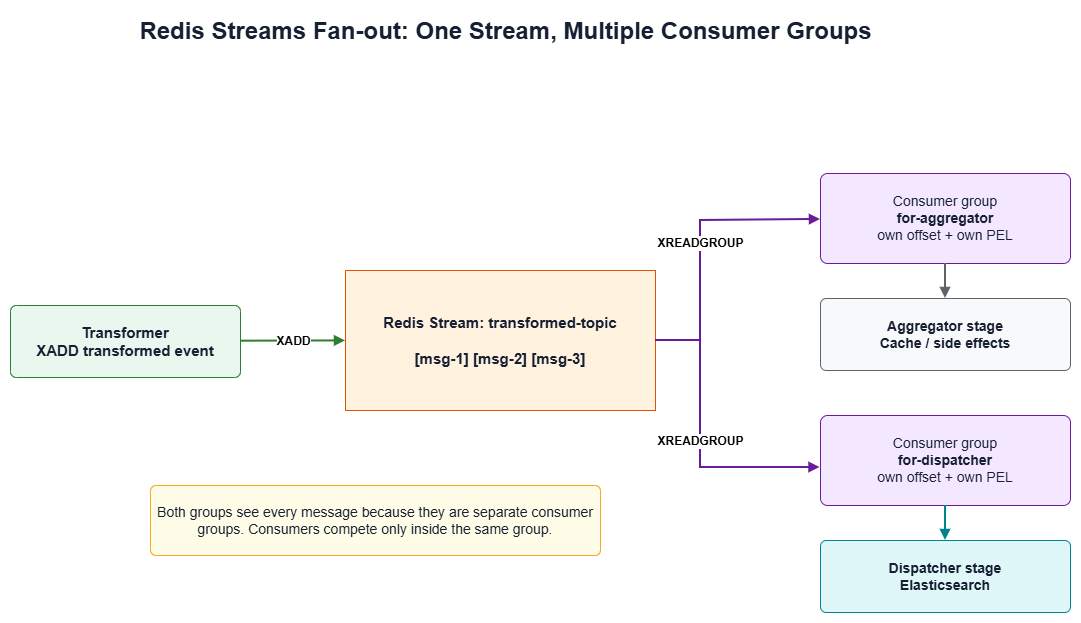
Messages on
transformed-topicare consumed by 2 groups at once (aggregator + dispatcher), and each group sees every single message — this is the fan-out pattern Redis Streams supports natively.
Key technical decisions
1. Keep the original stream and consumer group names
Stream and consumer group names should stay exactly the same as the Kafka originals during migration, to preserve compatibility with dashboards or external tools that reference those names — this removes an entire category of unnecessary breaking changes.
2. Use the event.overwrite() pattern inside Logstash inline code
If you're using a Logstash generator input to produce a synthetic "poll" event on every tick, and then XREADGROUP inside a filter returns the real message, overwrite the poll event's fields with event.overwrite(new_ev) rather than creating a new event some other way — this keeps behavior consistent when the pipeline chains multiple filters together:
entries = $r_in.xreadgroup(IN_GROUP, CONSUMER, IN_STREAM, '>', count: 1, block: 1000)
if entries && entries[IN_STREAM] && !entries[IN_STREAM].empty?
  id, fields = entries[IN_STREAM].first
  new_ev = LogStash::Event.new(JSON.parse(fields['data']))
  event.overwrite(new_ev)     # replace the poll event with the real data
  $r_in.xack(IN_STREAM, IN_GROUP, id)
else
  event.cancel                # no message → silently cancel the poll event
end
3. Verify XADD syntax against the redis client library version in use
Command syntax like XADD can differ noticeably between major versions of a client library (e.g. the ruby redis gem v4 vs v5 have different signatures). Always check the version bundled with the image before writing code — don't assume it matches whatever example you found online.
4. Consider a single Redis instance for multiple purposes
If the workload isn't huge, having one Redis instance serve as both the message broker (Streams) and a cache (e.g. a lookup table, a TTL-based seen-cache) reduces the number of instances/namespaces you have to maintain — at the cost of the two workloads competing for resources. Monitor memory and latency separately per use case.
5. ADD, don't REPLACE — run the old pipeline alongside the new one during migration
Keep the old (Kafka) pipeline running in parallel with the new (Redis Streams) one during the migration, with both writing to separate destinations (or separate indices/tables). This additive approach has zero downtime and lets you compare old vs. new pipeline output field-by-field before committing to the actual cutover.
Do you need to manually set up anything in Redis?
Short answer: no. There is no manual step — not XGROUP CREATE, not pre-creating the stream, nothing. Point a fresh Redis instance at these Helm values and the whole thing bootstraps itself on first pod start.
Every stage's init => block calls XGROUP CREATE ... MKSTREAM itself, wrapped in a retry loop that treats a BUSYGROUP error (group already exists) as a no-op rather than a failure. That means it's safe to run on every single pod (re)start — new machine, new namespace, pod crash-restart, doesn't matter, the same code path runs and either creates the group or discovers it already exists and moves on.
Producer example — logstash-receiver-redis/values.yaml (writes into received-topic):
logstash-beat-receiver-redis:
  extraEnvs:
    - name: REDIS_ETL_HOST
      value: "redis-streams.internal.svc.cluster.local"

  logstashPipeline:
    logstash.conf: |
      input {
        beats {
          port => 5044
          codec => "json"
          type => "log"
        }
      }

      filter {
        ruby {
          path => "/scripts/receiver-beat.rb"
          script_params => {}
        }

        ruby {
          init => '
            require "redis"
            require "json"

            STREAM = "received-topic"
            GROUP  = "for-transformer"
            MAXLEN = 100_000

            def connect_with_retry(host, port)
              attempt = 0
              begin
                r = Redis.new(host: host, port: port, timeout: 5, reconnect_attempts: 1)
                r.ping
                r
              rescue Redis::BaseConnectionError => e
                attempt += 1
                raise if attempt >= 30
                sleep [2 ** [attempt, 6].min, 30].min
                retry
              end
            end

            $r = connect_with_retry(ENV["REDIS_ETL_HOST"], 6379)

            # idempotent — safe to run on every pod start
            begin
              $r.xgroup(:create, STREAM, GROUP, "$", mkstream: true)
            rescue Redis::CommandError => e
              raise e unless e.message.include?("BUSYGROUP")
            end
          '
          code => '
            payload = event.to_json
            $r.xadd(STREAM, { "data" => payload }, id: "*", maxlen: MAXLEN, approximate: true)
            event.cancel
          '
        }
      }

      output {}
Consumer example — logstash-transformer-redis/values.yaml (reads from received-topic, writes into transformed-topic):
logstash-transformer-redis:
  extraEnvs:
    - name: REDIS_ETL_HOST
      value: "redis-streams.internal.svc.cluster.local"
    - name: POD_NAME
      valueFrom:
        fieldRef:
          fieldPath: metadata.name

  logstashPipeline:
    logstash.conf: |
      input {
        generator {
          count => 0        # infinite tick, no real events — Redis is the real input
        }
      }

      filter {
        ruby {
          init => '
            require "redis"
            require "json"

            IN_STREAM  = "received-topic"
            IN_GROUP   = "for-transformer"
            CONSUMER   = "transformer-#{ENV["POD_NAME"]}"   # stable name across restarts — see PEL note above
            OUT_STREAM = "transformed-topic"
            OUT_GROUP  = "for-aggregator"

            def connect_with_retry(host, port)
              attempt = 0
              begin
                r = Redis.new(host: host, port: port, timeout: 5, reconnect_attempts: 1)
                r.ping
                r
              rescue Redis::BaseConnectionError => e
                attempt += 1
                raise if attempt >= 30
                sleep [2 ** [attempt, 6].min, 30].min
                retry
              end
            end

            def ensure_group(r, stream, group)
              r.xgroup(:create, stream, group, "$", mkstream: true)
            rescue Redis::CommandError => e
              raise e unless e.message.include?("BUSYGROUP")
            end

            $r_in = connect_with_retry(ENV["REDIS_ETL_HOST"], 6379)
            ensure_group($r_in, IN_STREAM, IN_GROUP)
            ensure_group($r_in, OUT_STREAM, OUT_GROUP)
          '
          code => '
            entries = $r_in.xreadgroup(IN_GROUP, CONSUMER, IN_STREAM, ">", count: 1, block: 1000)
            if entries && entries[IN_STREAM] && !entries[IN_STREAM].empty?
              id, fields = entries[IN_STREAM].first
              new_ev = LogStash::Event.new(JSON.parse(fields["data"]))
              event.overwrite(new_ev)
              $r_in.xack(IN_STREAM, IN_GROUP, id)
            else
              event.cancel
            end
          '
        }
      }

      output {}
The one thing that is a real operational decision (not automated) is sizing MAXLEN per stream and the Redis instance's own maxmemory/maxmemory-policy — that's capacity planning you do once up front, not a manual command you run per-machine.
Limitations of Redis Streams
1. Data lives in RAM primarily
Redis keeps data in memory as its primary store, unlike Kafka, which writes every message to disk. Without persistence (AOF/RDB) enabled, stream data can be lost entirely on a Redis restart.
✅ Fix: enable
appendonly yes(AOF), or configure RDB snapshots in the Redis config.
2. No built-in retention like Kafka
Kafka has a log retention policy configurable by time or size. Redis Streams requires you to manage this yourself via MAXLEN or XTRIM, using the ~ (approximate trim) flag on XADD. Forget to set it, and the stream grows until it consumes all available memory.
# cap the stream at 100,000 messages (approximate)
$r.xadd(stream, { 'data' => payload }, id: '*', maxlen: 100_000, approximate: true)
3. No Log Compaction
Kafka supports log compaction to retain only the latest record per key. Redis Streams has no equivalent — every message is kept strictly in time order.
This pipeline never actually needed that feature in the first place — the events are security/audit logs, which need every single event preserved in order, not just the latest state per key. So this isn't a real loss for us.
4. Single Point of Failure (in standalone mode)
Running Redis standalone (no replication) means:
- Messages that haven't been XACK'd yet are lost if there's no persistence
- Every pipeline stage stops at once if the Redis pod goes down
- Kafka solves this the same way, with multiple brokers — but you have to configure the replication factor yourself from the start; it isn't free by default either
We hit this for real during our first deploy — the reconnect logic for Redis was originally written as an unbounded retry loop. When Redis actually went down, the pod didn't crash; it sat quietly in Running state, not ingesting anything. Kubernetes had no way to know it needed a restart, since the container never died. It took a while before anyone noticed the pipeline had stopped. The fix was to cap the retries (30 attempts, ~15 minutes) and then let it crash so Kubernetes would restart it — essentially a trade-off between "wait indefinitely to reconnect" and "give up and let the orchestrator handle it," which is the same kind of decision you'd face building HA into a Kafka consumer anyway.
For production environments that need HA, consider Redis Sentinel or Redis Cluster.
5. DLQ has to be built yourself (but so does Kafka's)
Redis Streams has no out-of-the-box DLQ. You handle errors yourself by:
- Not calling XACK when processing fails (the message stays in the Pending Entry List)
- Using
XPENDINGto check for stuck messages - Writing your own retry logic in the consumer
This isn't really a disadvantage — Kafka doesn't give you a free DLQ either. You still have to build one via a Kafka Connect dead-letter topic or a custom error handler in Kafka Streams. The amount of extra code is about the same either way.
6. Lower throughput ceiling than Kafka at high volume
Redis Streams is a good fit for tens of thousands to hundreds of thousands of messages/sec, while Kafka is designed for millions of messages/sec. If event volume grows substantially in the future, it may be worth revisiting Kafka or another alternative.
Things to watch out for when migrating
1. The Pending Entry List (PEL) is the main risk
When a consumer reads a message via XREADGROUP but hasn't called XACK yet, the message sits in the PEL. If the consumer crashes before acknowledging it, that message stays stuck there forever.
Check it with:
XPENDING received-topic for-transformer - + 10
Fix: use XCLAIM to reassign messages that have been pending too long to another consumer.
2. Consumer names must stay consistent across restarts
If a consumer restarts under a new name, messages already in the PEL stay assigned to the old name, and the new consumer never sees them — they get stuck permanently.
✅ Use a stable consumer name, such as a fixed pod name or a fixed string.
3. XGROUP CREATE requires mkstream: true
If the stream doesn't exist yet, CREATE-ing a group will error out unless you pass mkstream: true:
$r.xgroup(:create, stream, group, '$', mkstream: true)
4. Watch for memory leaks from streams without MAXLEN
If you add a new stream without setting MAXLEN, it will keep growing indefinitely. Set up a Prometheus alert for when redis_memory_used_bytes crosses your threshold.
5. Verify the redis gem/client library version matches the syntax you're using
Different client library versions can have noticeably different command syntax (see item 3 under "Key technical decisions"). Always check the version before upgrading the image or library.
6. No broker-level schema validation
Kafka supports Schema Registry (Avro/Protobuf), which forces producers/consumers to send data conforming to an agreed schema. Redis Streams has no such mechanism — you have to validate data format yourself at the application layer. Field name or type mistakes won't be caught until they reach the consumer.
In practice, though, our producer and consumer live in the same codebase (a Logstash filter maintained by the same team) — this isn't a case of multiple teams needing to agree on a shared schema, which is exactly the problem Schema Registry exists to solve. A basic field check in the ruby filter is enough; there's no need to carry that extra weight.
7. Test failover before decommissioning Kafka
Don't remove Kafka until the Redis Streams pipeline has been fully validated in production. Run both pipelines side by side for a while (the old pipeline as a safety net) and compare real data field-by-field before committing to the cutover.
8. Logstash doesn't auto-reload ruby filter scripts by default
Unless config.reload.automatic: true is explicitly set, Logstash compiles the ruby script (used in filter { ruby { path => ... } }) into memory only once, at pipeline startup. Updating the script file without restarting the process has zero effect on the running pipeline.
✅ Every time you change a ruby script, restart the associated process/pod (unless auto-reload is enabled), and verify with real output that the new code is actually running.
Prometheus Metrics for Redis ETL
Most Redis charts (e.g. Bitnami) ship with a redis_exporter sidecar built in. Enable it via values like:
redis:
  metrics:
    enabled: true
    serviceMonitor:
      enabled: true
Metrics worth monitoring:
| Metric | Description | Why it matters |
|---|---|---|
redis_stream_length |
Number of messages in the stream | Growing continuously = a consumer is slow or stopped |
redis_stream_groups |
Number of consumer groups | Check for groups that are no longer in use |
redis_stream_consumers |
Active consumers per group | Check for offline consumers |
redis_connected_clients |
Number of connected clients | Check for connection leaks |
redis_memory_used_bytes |
Memory in use | Alert when approaching the limit |
redis_keyspace_hits_total |
Cache hit rate | Measures cache effectiveness (if used) |
⚠️ Set an alert for when
redis_stream_lengthon any stream crosses an acceptable threshold — it may indicate a consumer problem.
Decommissioning Kafka after migration (pending validation)
Once the Redis Streams pipeline has been fully validated in production, only then consider removing Kafka from the infrastructure, through the team's normal deployment process (e.g. deleting the relevant manifests/config and letting the GitOps tool prune the resources automatically, if that's what you use).
Checklist before removing Kafka:
- Redis Streams pipeline has run stably for the required period (e.g. 7+ days)
- No accumulated consumer lag on the Redis streams
- The final destination (e.g. Elasticsearch) is receiving documents continuously
- No errors in consumer/dispatcher logs
- A recent Redis RDB/AOF backup is in place
When to use Kafka, and when Redis Streams is enough
| Situation | Better fit |
|---|---|
| High throughput, hundreds of thousands to millions of messages/sec | Kafka |
| Need to replay/reprocess logs far back in time (retention of weeks/months) | Kafka |
| Need log compaction (keep only the latest state per key) | Kafka |
| Strict schema validation required (Avro/Protobuf) | Kafka |
| Need enterprise-grade HA with a team dedicated to running the Kafka cluster full-time | Kafka |
| Small cluster, limited resources (e.g. single-node K3s) | Redis Streams |
| Throughput in the thousands to tens of thousands of messages/sec | Redis Streams |
| Want to reduce operational overhead (no team dedicated to Kafka) | Redis Streams |
| Short retention needed (hours to days) | Redis Streams |
| Want to reuse an existing Redis instance as both cache and message bus | Redis Streams |
Conclusion
Short version — if your cluster is small and throughput sits in the thousands-to-tens-of-thousands events/sec range like ours does, Redis Streams is a clear win over Kafka. Everything Kafka does better (compaction, Schema Registry, million-scale throughput, enterprise-grade replication) is stuff we never actually needed in the first place. The limitations we did run into on the Redis side (persistence, PEL, no free HA) are all solvable with a few lines of config (AOF, MAXLEN, Sentinel) — none of it was a dead end.
We'd been carrying a Kafka cluster around while using less than 1% of what it's capable of. Moving to Redis Streams was really just cutting away something we weren't using, not giving up any feature we actually relied on.