Deep Dive into Edge Deployment with Please Deploy Framework
This article is intended for: DevOps Engineers, Platform Engineers, and Infrastructure teams responsible for managing multiple Edge Servers simultaneously, who want to automate and systematize the provisioning process. Readers should have a foundational understanding of Linux, Kubernetes, and GitOps concepts.
TL;DR: Please Deploy Framework is a set of scripts for automatically bootstrapping K3s clusters on Edge Servers and integrating GitOps via ArgoCD — reducing manual operations and eliminating the need to SSH into each machine individually for configuration.
The Challenges of Edge Deployment at Real Scale
Edge Deployment sounds like a straightforward task of deploying an application to a remote server, but in practice it involves significantly more complexity than most people anticipate.
When you only have a handful of Edge Servers, manual installation is still manageable. You can SSH into each machine, run the K3s installation commands, configure the network, tune settings, and deploy workloads without spending too much time.
However, as the number of Edge Servers grows from single digits to tens or hundreds, familiar problems start to surface:
- Each server ends up with a slightly different configuration
- Component versions begin to diverge across machines
- Config drift accumulates over time
- Upgrades need to be repeated manually on every node
- Troubleshooting requires SSH-ing into each individual machine
In many cases, failures are not caused by the platform itself, but by Human Error — forgetting to open a port, using a config from the wrong version, deploying files to the wrong environment, or skipping steps in a runbook.
The more Edge Servers are spread across multiple locations, the more complex management becomes, since even a small change may need to be replicated across every cluster.
What appears to be a routine deployment task can quickly turn into a heavy operational burden — one that consumes far more time than most teams anticipated — across deployments, upgrades, and maintaining config consistency across all environments.
This is precisely why many teams are turning to Automation and GitOps: to transform Edge Deployment from a hands-on, error-prone process into one that is repeatable, auditable, and centrally managed.
Overview of Please Deploy Framework
The tool designed to address these challenges is Please Deploy Framework — a framework built specifically to automate K3s cluster installation and manage the entire Kubernetes platform through a full GitOps approach.
GitOps is a system management methodology that uses Git as the Single Source of Truth. Every configuration change must go through Git first, after which a tool like ArgoCD automatically pulls and applies those changes to the cluster.
This framework covers everything from cluster bootstrapping through to the delivery of production workloads, transforming every step into a workflow that is repeatable, auditable, and maintainable through Git.
The core workflow is organized into sequential phases, each with clear boundaries and fail-fast behavior when issues arise. Rather than being a monolithic script that is difficult to debug, this design makes it easy to recover from failures and allows teams to clearly understand the dependencies between components.
Why Please Deploy Framework?
Please Deploy Framework is designed to address Edge Deployment challenges at every scale — from a startup with just a few servers to a large enterprise managing tens or hundreds of Edge Servers.
Key Advantages
🚀 Automation from Day One
- Reduces Human Error from manual installation
- Fully Reproducible on every run
- Saves time when provisioning new servers
🔒 Security by Design
- Uses DNS Challenge — no need to expose port 80 to the public internet
- Centralized Secret Management via External Secrets
- Complete audit trail through Git history
- RBAC and Network Isolation from the start
📦 GitOps-Native
- Git as the Single Source of Truth
- Easy rollback via
git revert - Full history of every configuration change
- Declarative configuration that is easy to read and understand
🌐 Air-gapped Ready
- Running Gitea in-cluster enables operation even without internet connectivity
- Reduces dependency on external services
- Suitable for network-restricted environments
⚡ Lightweight and Efficient
- Uses K3s, which is lighter than full Kubernetes
- Low resource footprint, ideal for Edge devices
- Fast bootstrap — completed in under 30 minutes
🔄 Easy Upgrades and Maintenance
- Upgrade components with a single Git commit
- Automatic ArgoCD sync
- Staged rollout — test in staging before promoting to production
📊 Built-in Observability
- Prometheus + Grafana for metrics
- Loki for log aggregation
- Alert Manager integrated with Discord/Slack
Suitable for Organizations of Any Size
Startup (1–10 servers):
- Start with proper automation from the very beginning
- No need to refactor later when you scale
- Saves time on manual configuration
Growing Company (10–50 servers):
- Scale easily without changing the architecture
- Config consistency across all environments
- Easy team collaboration through Git workflow
Enterprise (50+ servers):
- Efficiently manage tens or hundreds of Edge Servers
- Multi-environment support (dev, staging, production)
- Compliance-ready with a complete audit trail
Evolution Path: From Manual to GitOps
Please Deploy Framework is ideal for organizations evolving from manual operations toward GitOps-level automation.
Stage 1: Manual Operations (1-5 servers)
  └─ SSH + bash scripts + documentation
  └─ Suitable for: Startup, PoC, Small teams

Stage 2: Configuration Management (5-20 servers)
  └─ Ansible/Chef + Git + CI/CD
  └─ Suitable for: Growing teams, Multiple environments

Stage 3: GitOps-Driven (20-100 servers) ← Please Deploy sits here
  └─ K3s + ArgoCD + Gitea + Declarative config
  └─ Suitable for: Edge deployment, IoT platforms, Multi-site

Stage 4: Enterprise Platform (100+ servers)
  └─ Rancher/Fleet + Multi-region + Service mesh
  └─ Suitable for: Large enterprises, Global infrastructure
This framework is designed for teams at Stage 2–3 who want to move to GitOps without investing in a complex and costly enterprise platform.
Architecture Overview
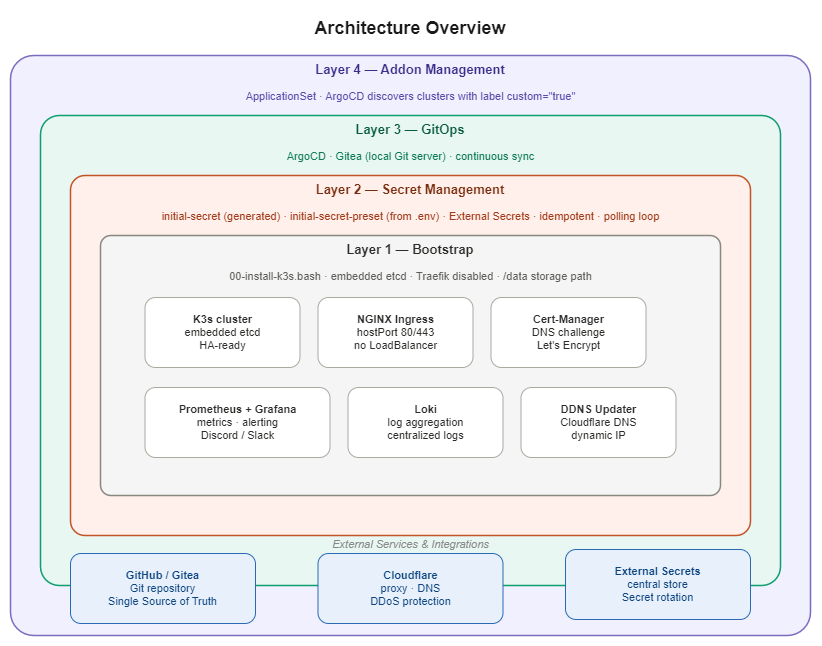
The architecture of Please Deploy Framework is divided into 4 main layers, separating the responsibilities of each component and making the platform easier to scale.
Layer 1 - Bootstrap Layer
The Bootstrap Layer operates via the 00-install-k3s.bash script. It downloads and installs K3s with standard settings for a small cluster running embedded etcd — the datastore for Kubernetes — to support future High Availability, while also disabling the Traefik service that ships with K3s so that Ingress NGINX can take over traffic management instead.
Layer 2 - Secret Management Layer
The Secret Layer installs and prepares secret management via the 01-initial-secrets.bash script. It generates initial Encryption Keys from the .env file and converts those values into Kubernetes Secrets before any other component attempts to consume them — establishing the first security checkpoint of the environment.
Layer 3 - GitOps Layer
The GitOps Layer installs the GitOps stack, which consists of ArgoCD and Gitea. Both run inside the cluster, with Gitea serving as a private Git server that eliminates any dependency on external services.
ArgoCD is a tool that continuously monitors a Git Repository and automatically applies any changes to the Kubernetes cluster.
Gitea is a self-hosted Git server that runs on-premises, storing configuration locally without sending any data outside the cluster.
Layer 4 - Addon Management Layer
The Addon Layer manages platform components through ApplicationSet files — a Custom Resource in ArgoCD that generates multiple Applications from a single template. ArgoCD discovers clusters labeled custom: "true" and precisely delivers the appropriate add-on services to each target cluster.
Design Philosophy: Sequential Phases and Clear Boundaries
This framework is designed so that each phase has clear boundaries and fails fast when issues occur, rather than being a monolithic script that is hard to debug.
Phase 1: Bootstrap Layer
Concept: Establish a Kubernetes cluster foundation that is ready for High Availability and Monitoring from day one.
Design Decisions:
- Use embedded etcd instead of an external datastore to reduce dependencies and prepare for multi-node HA
- Disable Traefik (K3s's default ingress) to let NGINX handle more complex routing, especially for integration with Cloudflare
- Enable etcd metrics from the start so Prometheus can immediately collect datastore health data
- Set the storage path to
/datato accommodate production servers that typically have a dedicated disk for persistent data
Phase 2: Secret Management Layer
Concept: Create all Secrets and Credentials before any other component starts, to prevent Race Conditions.
Design Decisions:
- Apply the Idempotency pattern so scripts can be re-run without generating duplicate values
- Use polling loops to wait until Secrets are successfully created, rather than assuming everything completes immediately (since Kubernetes Jobs execute asynchronously)
- Separate Secrets into 2 tiers:
initial-secret(auto-generated) andinitial-secret-preset(from the.envfile) to clearly distinguish auto-generated values from user-provided values
Advantage: High security and effective prevention of Race Conditions.
Phase 3: Core Addons Layer
Concept: Install 5 core components required for a GitOps platform using K3s HelmChart CRDs instead of the Helm CLI.
Design Decisions:
- ArgoCD: The GitOps controller that is the heart of automation
- NGINX Ingress: Uses
hostPortinstead of a LoadBalancer to reduce complexity in Edge environments - External Secrets: Pulls Secrets from a central store instead of hardcoding them in each cluster
- Cert-Manager: Uses DNS Challenge instead of HTTP Challenge because Edge Servers are often behind NAT
- Gitea: Local Git server to support air-gapped deployments
Advantage: Achieves internet-independent operation with high flexibility.
Phase 4: GitOps Bootstrap Layer
Concept: Connect ArgoCD to the Git repository and initiate the continuous sync workflow.
Design Decisions:
- Supports both pulling directly from GitHub and pulling from the local Gitea instance
- Uses the cluster label
custom: "true"to allow ApplicationSet to flexibly select target clusters - Uses a git-sync-job to pull code from the remote and store it in local Gitea, supporting air-gapped scenarios
Advantage: High flexibility — you can choose where to pull configs from, and the setup supports both online and offline deployments.
Repository Structure and GitOps Pattern
The project folder structure reflects the principles of separation of concerns and progressive deployment:
please-deploy/
├── 00-configs/          # Core addon definitions
├── 00-install-k3s.bash  # Phase 1: Cluster bootstrap
├── 01-initial-secrets.bash  # Phase 2: Secret management
├── 02-initial-addons.bash   # Phase 3: Core components
├── 04-boot-strap.bash       # Phase 4: GitOps activation
├── 01-bootstrap/        # ArgoCD connection configs
├── 03-monitoring/       # Observability stack configs
└── 99-deployments/
    ├── applications/    # ApplicationSet definitions (1 file per service)
    └── manifests/       # Helm values per service
GitOps Pattern: Declarative and Auditable
The core principle of GitOps is using Git as the Single Source of Truth, ensuring every change has an audit trail and can be easily rolled back.
Advantages of the GitOps Pattern:
- Single Source of Truth: All changes flow exclusively through Git
- Audit Trail: Full change history is visible through Git history
- Easy Rollback: Git revert followed by automatic ArgoCD sync
- Declarative: Defines the desired state — not the steps to get there
- Collaboration: Teams can work together easily through Git workflow
- Version Control: Every config has a complete version history
Key Components and Design Rationale
Once GitOps is fully operational, ArgoCD automatically syncs and deploys these services into the cluster. Here is the reasoning behind each component selection:
Cert-Manager + DNS Challenge Pattern
Problem: Edge Servers are often behind NAT or a firewall, preventing Let's Encrypt from reaching port 80 to complete the HTTP Challenge.
Approach: Use DNS Challenge via the Cloudflare API instead, eliminating the need to expose port 80 to the public internet.
Advantages:
- More secure — no port exposure required
- Works even when the server is behind NAT
- SSL certificates renew automatically
External Secrets Pattern
Problem: Hardcoding Secrets in each cluster makes rotation difficult and introduces security risks.
Approach: Use a ClusterSecretStore to pull Secrets from initial-secret-preset as the central source.
Advantages:
- Easy Secret rotation (update once, sync everywhere)
- Reduces Secret sprawl
- Centralized management for simplified control
Ingress Pattern: NGINX + Cloudflare Proxy
Problem: Edge Servers may have dynamic Public IPs and require hiding the origin server's identity.
Approach:
- Use NGINX Ingress with
hostPortinstead of a LoadBalancer - Use a DDNS updater to automatically update Cloudflare DNS
- Use Cloudflare Proxy to mask the origin IP
Advantages:
- No LoadBalancer costs
- Origin IP is masked by Cloudflare
- DDoS protection from Cloudflare
- SSL termination at the Cloudflare edge
Monitoring Stack Pattern
Problem: The Prometheus Operator ships with a large number of CRDs. Installing it alongside core components risks overwhelming the Kubernetes API server.
Approach: Install monitoring separately as the final step, with a polling loop that waits for CRDs to be fully ready before proceeding.
Advantages:
- Reduces race conditions during installation
- Monitoring does not block core platform readiness
- Complete observability with Prometheus + Grafana + Loki
Local Git Server (Gitea) Pattern
Problem: Edge Servers may operate in air-gapped environments or have unreliable internet connectivity.
Approach: Run Gitea inside the cluster and use a git-sync-job to pull code from the remote and store it locally.
Advantages:
- Operates normally even when internet connectivity is lost
- Lower latency compared to always pulling from GitHub
- Data sovereignty — configuration never leaves the cluster
- Simplified backup and disaster recovery
Deployment Workflow: From Bare Metal to GitOps
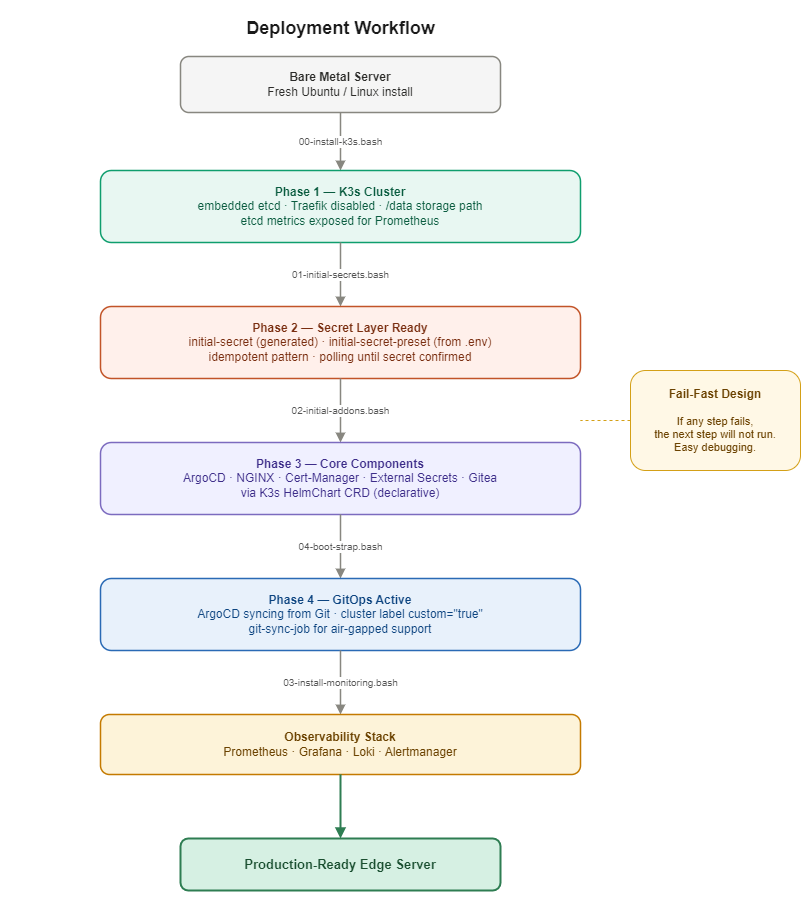
Bootstrapping a new Edge Server is a sequential process where each step has explicit dependencies:
Why This Specific Order?
Dependency Chain:
- K3s first (
00-install-k3s.bash) → Without a cluster, there is nowhere to run other components - Secrets before Addons (
01-initial-secrets.bash) → Gitea needs an admin password; Cert-Manager needs the Cloudflare API key - Addons before Bootstrap (
02-initial-addons.bash) → ArgoCD must be ready before it can be connected to Git - Bootstrap before Monitoring (
04-boot-strap.bash) → Monitoring requires CRDs from the Prometheus Operator, which must wait for the API server to be ready - Monitoring last (
03-install-monitoring.bash) → Installed after the core platform is fully operational
Fail-Fast Design: If any step fails, subsequent steps will not execute — making it far easier to debug than a monolithic script that fails halfway through.
Security by Design: Security Built In from the Start
This framework designs the Edge platform with Security by Design as a foundational principle, reducing the attack surface through systematic configuration choices and deliberate architectural decisions.
Defense in Depth Strategy
Layer 1: Network Security
- No port 80 exposed to the public internet: DNS Challenge is used instead of HTTP Challenge
- Minimal open ports: NGINX uses
hostPortto accept traffic exclusively on 80/443 - Origin IP masking: Cloudflare Proxy protects against direct attacks
- Hidden admin interfaces: All dashboards are accessible only via sub-path URLs, e.g.,
/tools/argocd
Layer 2: Access Control
- Least Privilege RBAC: The secret manager has only
get,create, andpatchpermissions — nodelete - Registration disabled: Gitea is configured with
DISABLE_REGISTRATION: true - Namespace Isolation: Each service runs in its own dedicated namespace
Layer 3: Secret Management
- Secret Rotation:
refreshInterval: 1mcauses Secrets to refresh every minute - Centralized Secrets: ClusterSecretStore serves as the single source of truth
- No Hardcoded Secrets: All Secrets are sourced via External Secrets
Layer 4: Supply Chain Security
- Git as Audit Trail: Every change is tracked through Git commits
- Declarative Config: No imperative commands that can bypass the audit trail
- Local Git Server: Reduces dependency on external services
Security Advantages
This framework provides multiple layers of security:
🔐 Network Security
- No port 80 exposed to the public internet
- Only ports 80/443 are open
- Origin IP is masked by Cloudflare
- Admin interfaces are hidden behind sub-path URLs
🔑 Access Control
- Least Privilege RBAC
- Gitea registration is disabled
- Namespace Isolation
🔒 Secret Management
- Automatic Secret rotation every minute
- Centralized secrets through ClusterSecretStore
- No hardcoded secrets in Git
📝 Audit and Compliance
- Every change has a Git commit history
- Declarative config is fully auditable
- Easy rollback via
git revert
Upgrade Strategy: GitOps-Driven Change Management
One of the most powerful aspects of a GitOps-based design is a systematic and auditable upgrade process.
Upgrade Workflow
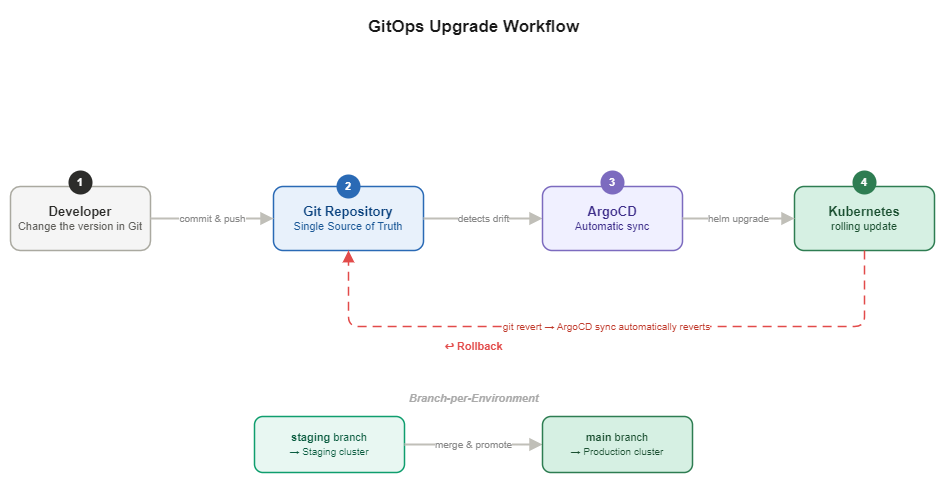
Branch-per-Environment Strategy
The key mechanism is the targetRevision: "{{name}}" parameter in the ApplicationSet, which locks each cluster to the Git branch that matches its name.
Example Upgrade Flow:
-
Test on Staging First
git checkout staging
# Update the version in addons-cert-manager.yaml
git commit -m "Upgrade cert-manager to 1.20.0"
git push origin staging
ArgoCD will sync only to the cluster named
staging. -
Verify and Promote to Production
git checkout main
git merge staging
git push origin main
ArgoCD will sync to the cluster named
main.
Rollback Strategy
Scenario 1: Rollback via Git
git revert <commit-hash>
git push
ArgoCD will detect the change and automatically sync back to the previous version.
Scenario 2: Rollback via ArgoCD UI
- Open the ArgoCD UI
- Select the Application to roll back
- Click "History and Rollback"
- Select the desired revision
Advantages of GitOps Upgrades
✅ Key Benefits:
- Audit Trail: Full history of every upgrade is visible
- Easy Rollback: Git revert triggers automatic sync
- Staged Rollout: Test in staging before promoting to production
- Declarative: Specify the desired version — not the steps to get there
- Zero Downtime: ArgoCD performs rolling updates automatically
- Consistency: Every cluster receives the same version
Real-World Use Cases
This framework is not just a theoretical concept — it addresses real business requirements:
- Security Sensor Platform: Ingests and transmits data from IoT sensors deployed on-site for real-time threat assessment.
- Multi-environment Edge: Clearly separates settings and traffic between Dev and Prod using a single shared codebase.
Lessons Learned and Best Practices
Building this framework distilled into a number of key lessons and best practices.
✅ What Worked Well
1. Sequential Phases with Clear Boundaries Splitting the bootstrap process into sequential scripts gives each layer a clear boundary and enables fail-fast behavior when issues arise, rather than having a monolithic script that is difficult to debug.
2. K3s HelmChart CRD over Helm CLI
Using HelmChart Custom Resources instead of scripted Helm CLI calls enables declarative lifecycle management of core services, making auditing and rollbacks significantly easier.
3. Local Git for Air-gapped Readiness Running Gitea in-cluster reduces dependency on external services. The platform continues to operate normally even if internet connectivity is lost — a critical requirement for Edge deployments.
4. Secrets-First Approach Creating Secrets as the very first step prevents Race Conditions that occur when other components start before the primary keys are ready.
5. Separate Monitoring Installation Installing monitoring separately with a readiness polling loop avoids issues caused by the Kubernetes API not yet being ready to process large CRDs.
🎯 Best Practices
1. Use the Idempotency Pattern
# ✅ Do this
kubectl apply -f config.yaml
# or
kubectl create secret generic my-secret --dry-run=client -o yaml | kubectl apply -f -
This allows scripts to be re-run without errors.
2. Use Immutable Tags
# ✅ Do this
image: nginx:1.25.3
This makes deployments reproducible and predictable.
3. Implement Health Checks
# Wait for the component to be ready before proceeding
until kubectl get secret initial-secret -n default; do
  sleep 2
done
4. Document Technical Decisions
# Record TODOs and Technical Debt in the code
# TODO: Use immutable tag instead of "latest"
This ensures the team knows what needs to be revisited later.
5. Use GitOps for Everything Every change goes through Git, ensuring a complete audit trail.
Future Roadmap: Beyond Edge Deployment
The development roadmap is focused on expanding capabilities and increasing automation.
1. Multi-node High Availability
- The framework already uses
--cluster-initto support etcd - The next step is additional scripts for joining standby servers to enable load balancing
- Improves platform reliability and uptime
2. GUI Dashboard for Operators
- Develop a web interface allowing users unfamiliar with the CLI to monitor and control application Sync operations
- Real-time monitoring and alerting
- One-click deployment and rollback
3. AI-assisted Operations
- Use AI to analyze logs and surface alerts from Edge Servers
- Auto-remediation for common recurring issues
- Predictive maintenance and capacity planning
Conclusion: From Manual Operations to GitOps-Driven Infrastructure
Please Deploy Framework solves the day-to-day challenges faced by Infrastructure teams by transforming a complex, Human Error-prone Edge Deployment process into a repeatable and auditable system — centered on the GitOps principle of using Git as the single hub for all changes.
Key Takeaways
1. Sequential Phases Reduce Complexity Splitting the bootstrap process into 4 phases with clear boundaries makes debugging easier and enables fail-fast behavior when issues arise.
2. GitOps Provides Audit Trail and Rollback Every change is tracked through a Git commit, making it fully auditable and easy to roll back.
3. Air-gapped Ready with Local Gitea Running a Git server in-cluster keeps the platform operational even when internet connectivity is unavailable.
4. Security by Design from the Start Using DNS Challenge, centralized secrets, RBAC, and network isolation significantly reduces the attack surface.
5. Suitable for Organizations of Any Size Whether you have 1 server or 100 servers, this framework brings systematic management and effortless scalability.
Why Start Today?
🚀 For Startups:
- Start with proper automation from day one
- No need to refactor later when you scale
- Save time and reduce Human Error
📈 For Growing Companies:
- Scale easily without changing the architecture
- Config consistency across all environments
- Easy team collaboration through Git workflow
🏢 For Enterprises:
- Efficiently manage tens or hundreds of Edge Servers
- Multi-environment support (dev, staging, production)
- Compliance-ready with a complete audit trail
From Concept to Production
This framework is not merely a theoretical concept — it has been deployed in real-world use cases:
- Security Sensor Platform (IoT) — real-time data ingestion and transmission from sensors
- Multi-environment Edge — clear separation of Dev/Prod environments
Next Steps
If you are interested in adopting these concepts:
- Start with a Single Server — test on a trial server first
- Adapt to Your Context — every organization has different requirements
- Measure Metrics — track deployment time, error rate, and MTTR
- Scale Gradually — add servers incrementally and learn from experience
View the Source Code
For the source code and implementation details, visit:
- Control Plane: github.com/wintech-thai/please-protect-rproxy
- Data Plane: github.com/wintech-thai/please-protect-rproxy-data-plane
Please Deploy Framework: GitOps-Driven Edge Deployment that makes Infrastructure management straightforward — no matter how many servers you have.